

A broad prompt for a tool for an operations team gives an LLM plenty of room to produce a dashboard. It has a sidebar, metric cards, a chart, status pills, and an eyebrow, the small label above the heading. The eyebrow is especially efficient: it makes the screen look considered before anyone has decided what the screen should help someone do.
The dashboard may contain useful information. It can also be the wrong place to start. The prompt named a kind of user; the model selected a way to organize that user’s work. No one on the team made that decision, but it arrived as working code.
This is the usability problem in software built with AI. A prototype that runs invites people to improve what is already on the screen. They ask for another filter, a different label, perhaps a way to export the report. Those suggestions have value. They can also keep a team busy refining a workflow that nobody chose. Sunk costs apparently accrue quite quickly.
The Design Step That Disappeared
For years, software teams worked through the design before they could build much of the product. Wireframes were cheap places to move whole sections and change the sequence of a task. More detailed mockups and clickable prototypes, often made in Figma, let someone attempt that task before engineers had wired everything up. A team could discover that the navigation was wrong, that two steps belonged together, or that an entire section served no purpose.
Real data and actual use would expose more problems after the build. Loading delays, errors, permissions, and recovery seldom behaved as neatly as they did in the mockup. Design continued. The old process was neither tidy nor foolproof, but it gave teams a stage at which the organization of the work was visibly provisional. Deleting half a wireframe could count as a productive afternoon.
Generated code has removed the practical reason for much of that sequence. A product manager, engineer, or consultant can produce a plausible first version before anyone has done the equivalent design work. That is a substantial gain in speed. It also means the model fills gaps in the brief with familiar patterns, and the team inherits them.
The old design work also separated different jobs that happened to share the same data. A dispatcher, an approver, and a director may all care about late shipments. They will not necessarily begin in the same place or need the same authority in the tool. Those questions were easier to raise while the interface was still a set of movable rectangles.
A rough sketch announces that it is unfinished. A working application with decent spacing and a coherent color scheme has a different effect. Once people can click through it, their comments tend to concern what is already there. Getting to something close enough to show is now fast; reconsidering the basic structure can feel like going backward, even when that structure took an afternoon to generate.
It changes the meeting as well. Someone may say the at-risk count is useful, and the team hears that the screen works. During a demonstration, the presenter knows which chart to open and fills gaps with spoken explanation. The dispatcher will not have a presenter standing nearby when a delivery is in trouble.
The Shipment Is Still Late
Consider a fictional operations tool called Dispatch. Its dashboard reports 248 active shipments, an on-time delivery rate of 96.4%, and seven shipments at risk. One contains parts for Northline Assembly. The scheduled truck is unavailable, and the customer needs the parts that afternoon.
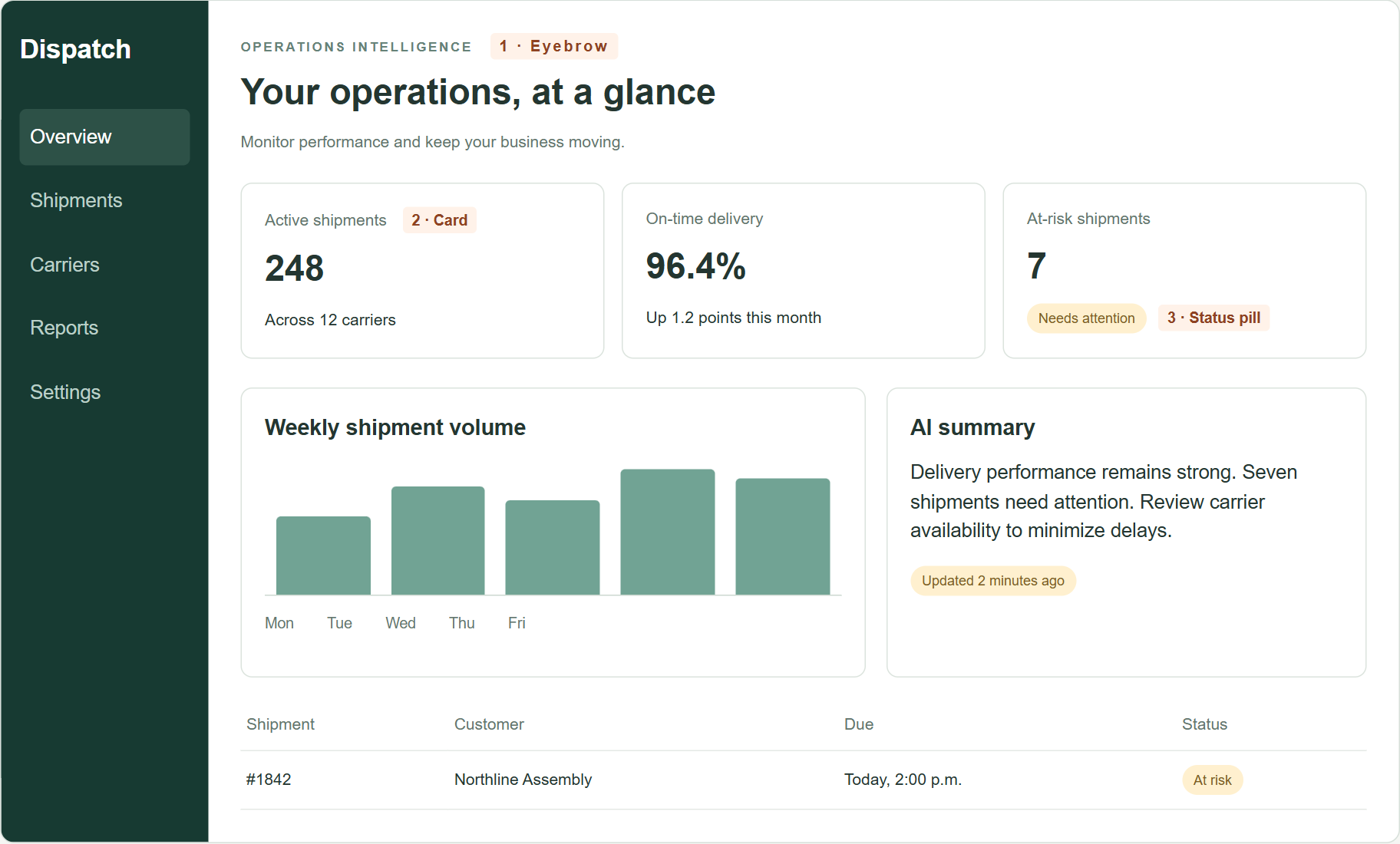
The at-risk count is useful. The operations manager still needs to decide what to do. That requires knowing when the parts are actually needed, what another carrier can do, what it will cost, who can authorize the spend, and who will make sure the response happens. A chart of weekly shipment volume has little to say about any of this. It is, however, already built.
A dashboard could be the right starting point for someone reviewing overall performance. A dispatcher juggling seven exceptions may need a queue organized by customer consequence and time left to act. An occasional approver may need a short explanation of one proposed expense. These are different jobs inside the same operation. A generic request for an operations tool settles none of them.
Describing the work instead of the audience gives the model another starting point. “Help a manager resolve a late shipment and assign the response” can produce a screen organized around the decision. For shipment 1842, that screen shows the customer’s confirmed 3:00 p.m. deadline, a dedicated courier that can arrive before 2:00 p.m. for an additional $420, and a hold on that option that expires at 10:45 a.m. It also distinguishes requesting approval from booking the courier, a detail the customer will eventually care about.
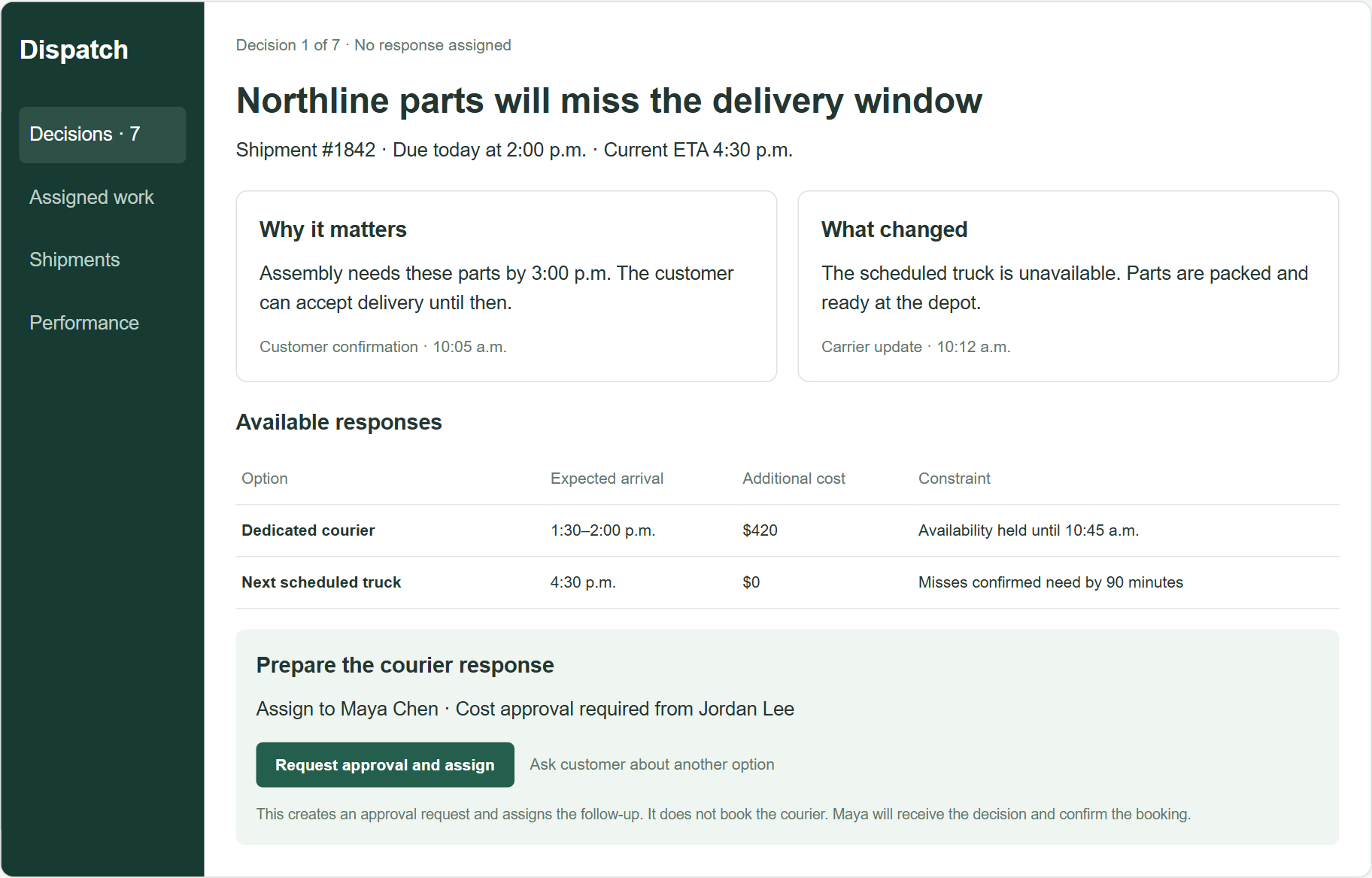
The change in prompt is useful, but it cannot settle the design. Someone still has to decide whether the manager should begin by choosing which exception matters, confirming the customer’s deadline, or comparing response options. A model can make a screen for each. The choice about how the work should proceed has moved into the brief for the generated code.
This screen may be wrong too. The dispatcher may need to compare several shipments before allocating the only available courier. Approval might happen in another system. The customer’s deadline might change. Those possibilities are reasons to explore other arrangements, including a queue or a guided approval view. Adding more cards to the dashboard would leave the larger choice untouched.
Treat the First Build Like a Sketch
Fast prototyping should make large design changes easier to try. In practice, the first generated screen often becomes the starting point for every subsequent discussion. UX design has to reach that screen before its structure feels settled. Code that took an afternoon to generate can be replaced without holding a small memorial service.
This matters especially in business software, where a tidy dashboard can sit on top of a process that still runs through email, phone calls, and permission chains. The application can look complete because those handoffs are invisible in the prompt. They are usually quite visible to the person who has to get the work done.
For Dispatch, the useful comparison is between different ways to organize the work: monitoring performance, prioritizing exceptions, resolving one shipment, and approving a response. LLMs can make working versions of each and suggest awkward cases such as two urgent shipments competing for one courier. That makes it possible to explore more than one structure before the organization commits to one.
A UX practitioner can help establish where the work really begins, what the dispatcher needs to know, which decisions belong to someone else, and what happens after approval. A rough sketch may answer a question about sequence. A working prototype can show what happens when an approval is delayed or a courier option expires while someone is deciding. Watching someone handle an actual shipment exception is still useful, especially when the screen looks so plausible that its basic assumptions are easy to miss.
The old schedule forced a pause between deciding what to build and writing the code. That pause is gone. The design decision has not gone with it. Someone still has to decide whether the product is for monitoring performance, resolving exceptions, or approving a response. The model can render any of them. It should not get the deciding vote simply because its first answer ran.